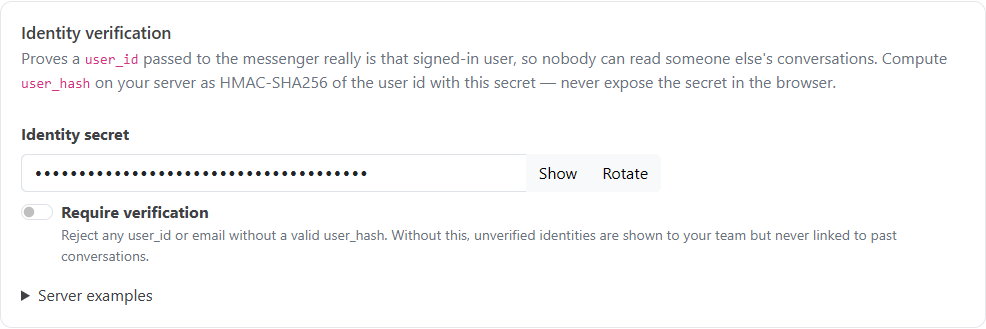
Identity verification proves that a signed-in user is who your website says they are. It stops anyone from reading another person's conversations by putting that person's user ID in the messenger snippet. Use it whenever you pass user_id or email to the messenger.
user_hash.Without a valid user_hash, the name and email are still shown to your team, marked Unverified. They're never used to look up anyone's earlier conversations.
Go to Inbox, then Messenger settings, then the Install & security tab. Under Identity verification, click Show next to Identity secret. Keep this secret on your server. Never put it in browser code.
The hash is an HMAC-SHA256 of the user's ID, using your secret, written as lowercase hex. If you don't pass a user ID, sign the email instead. A signed email is verified, but it doesn't link the visitor's conversations across devices, and it isn't enough for signed-in actions, which need a verified user ID.
| Language | Code |
|---|---|
| Node.js | crypto.createHmac('sha256', SECRET).update(user.id).digest('hex') |
| C# | Convert.ToHexString(new HMACSHA256(Encoding.UTF8.GetBytes(SECRET)).ComputeHash(Encoding.UTF8.GetBytes(user.Id))).ToLowerInvariant() |
| PHP | hash_hmac('sha256', $user->id, $SECRET) |
| Python | hmac.new(SECRET.encode(), user.id.encode(), hashlib.sha256).hexdigest() |
Then pass it in the snippet alongside the user's details:
window.HelpGuidesChatSettings = {
  app_id: "YOUR_APP_ID",
  user_id: "12345",
  email: "[email protected]",
  name: "Jane Doe",
  user_hash: "HASH_FROM_YOUR_SERVER"
};Once every page that passes user details also passes a user_hash, switch on Require verification. The messenger then refuses any user ID or email without a valid hash.
Click Rotate to create a new secret. Every hash made with the old secret stops working immediately, so update your server at the same time.
An action with Only for signed-in customers, and send their user ID turned on lets the AI look up the customer's own account, for example "what plan am I on?". Identity verification is what makes these safe:
user_id comes with a valid user_hash. Anonymous and unverified visitors never get it.See Chat Actions for setting them up.
If someone chats anonymously and then signs in with a verified user ID, their earlier conversations move to their verified account automatically.
Call HelpGuidesChat('shutdown') when a user signs out of your site. Until you do, the browser stays verified as that user. The next person on that browser could see their conversations, and signed-in actions would still look up the previous user's account.
See also Installing the Chat Messenger on Your Website and Chat Messenger JavaScript API.